I then photographed a range of different objects, this time using a black background to also show experimentation with photographing still life. I chose the use these objects and placed there where I thought would look good, I placed some stones and shells inside the bottle and placed some next to it to show two different looks for the stones, and also placed the mannequin hand at the top of the bottle to make it look like it was about to be picked up, and also places some bigger shells and stones behind to give more to the image. I played about with the lights slightly and have chosen this image because everything is placed out nicely, the lighting is good and I think that this is a good representation of still life photography.
Thursday, 30 October 2014
Still life
In the studio I have photographed still life objects. Starting off with using a white background and using these objects which include my watch and phone, and parts of nature. I placed these objects on the table and photographed them from above and straight on. I have done this as an experiment on photographing still life. Although I like the image photographed straight on, if this image was to be used to advertise the image from above would be a better image because the objects are more visible and shows a lot more detail than the one from straight on.

I then photographed a range of different objects, this time using a black background to also show experimentation with photographing still life. I chose the use these objects and placed there where I thought would look good, I placed some stones and shells inside the bottle and placed some next to it to show two different looks for the stones, and also placed the mannequin hand at the top of the bottle to make it look like it was about to be picked up, and also places some bigger shells and stones behind to give more to the image. I played about with the lights slightly and have chosen this image because everything is placed out nicely, the lighting is good and I think that this is a good representation of still life photography.
Sunday, 12 October 2014
Adjustment Layers
Adjustment layers are used to adjust images in separate layers so if something goes wrong the original image isn't ruined and lost and you can experiment with different techniques without having to keep reopen the image and start again. One layer can be used for each tool if you want to use more than one to adjust the image. So if you use one tool and get the image the way you want it, then use the next one and you don't like how it turns out you can just delete that layer instead of having to start again.
Hue/Saturation

Adding an adjustment layer and using the Hue/Saturation tool I have experimented changing the colours of parts of this image and have got the outcome of this image. I have shown the layers to show that I have one Hue/Saturation layer over the top of the background so if I don't like the way this image now is I can delete this layer and have my image back to how it was. I like the way this tool has changed the colours in this image and makes it look a little more dull but still has colour in it.
Black and White
After experimenting with Hue/Saturation I deleted that layer and moved onto Black and White using a new adjustment layer. I have experimented with this setting and got the outcome of this image, I have made this image so that is it not all completely black and white, I have left some slight colour in her hair, and also using the pain brush I have removed the black and white in the ear to show the bright yellow colour in the ear plug, I really like this image and think that bringing some colour back into a black and white image works well.
Curves
Lastly, after experimenting with black and white I deleted that layer and adding a new adjustment layer moved onto using curves. I experimented with moving the curve bar around until I got it into a position to make the image look how I like it, I have given the image a little more light to make it bright, but not too bright and with this image I think it works well and isn't too bright.
Hue/Saturation

Adding an adjustment layer and using the Hue/Saturation tool I have experimented changing the colours of parts of this image and have got the outcome of this image. I have shown the layers to show that I have one Hue/Saturation layer over the top of the background so if I don't like the way this image now is I can delete this layer and have my image back to how it was. I like the way this tool has changed the colours in this image and makes it look a little more dull but still has colour in it.
Black and White
After experimenting with Hue/Saturation I deleted that layer and moved onto Black and White using a new adjustment layer. I have experimented with this setting and got the outcome of this image, I have made this image so that is it not all completely black and white, I have left some slight colour in her hair, and also using the pain brush I have removed the black and white in the ear to show the bright yellow colour in the ear plug, I really like this image and think that bringing some colour back into a black and white image works well.Curves
Wednesday, 8 October 2014
Manual camera settings
The light meter
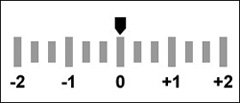
The light meter is used whilst taking a photograph to make sure that the image is correctly exposed, for it to be correctly exposed the arrow has to be on zero. If the arrow is below zero which is to the left this means the image is under exposed and if it is above zero which is to the right the image will be over exposed. To get the correct exposure the aperture, shutter speed and ISO all have to be correctly in sync whilst using the light meter to make sure these settings are correct to have the right exposure.
First off I was asked to set my camera to manual and select the appropriate ISO for the lighting conditions, using the light meter to take a correctly exposed photograph. I started off by setting the shutter speed to 1/60, the aperture to f5 and the ISO on 800, whilst taking this photograph I made sure that the light meter was on 0 to make sure that this photograph was correctly exposed.
Then for the task I was set I had to under expose the image changing the aperture. Which I did keeping the shutter speed at 1/60, the ISO at 800 and changing the aperture to f13 which gave me this under exposed image by making the aperture smaller, to make sure this image was under exposed I have to make sure the arrow was below 0 on the light meter.

For the second task of this section I was then asked to over expose the image also changing the aperture only, but with the aperture on the highest it could go on I could not get an image over exposed by only changing the aperture, so i changed the ISO to 3200, with the aperture on f4.8 and keeping the shutter speed on 1/60, to make sure this image was over exposed I made sure that the was over 0 on the light meter.
For the next set of tasks I was asked to revert back to the correct exposure settings, then take an under exposed image changing only the shutter speed, I changed the shutter speed to 1/640, with the aperture on f8 and the ISO on 800, with these settings I was able to get an under exposed image by changing the shutter speed and making it faster which allows in less light.

Secondly I was asked to take an over exposed image using the same rule of only changing the shutter speed. To do this I changed the shutter speed to 1/30 and kept the aperture at f5 and ISO at 800 and with these settings I was able to get an under exposed image by changing the shutter speed to make it slower which allows in more light.
For the last set of tasks I was asked to revert back to the correct exposure settings and this time taking and under exposed image changing only the ISO. So using a shutter speed of 1/60 and an aperture of f5, I changed the ISO to 100 I was able to create the this under exposed image by only lowering the ISO.

Lastly, using the same rule of changing the ISO only, I was asked to take an over exposed image. To get this image I changed the ISO to 3200 with a shutter speed of 1/60 and aperture of f5.6 and with these settings I was able to get this over exposed image by choosing a higher ISO number.
The light meter is used whilst taking a photograph to make sure that the image is correctly exposed, for it to be correctly exposed the arrow has to be on zero. If the arrow is below zero which is to the left this means the image is under exposed and if it is above zero which is to the right the image will be over exposed. To get the correct exposure the aperture, shutter speed and ISO all have to be correctly in sync whilst using the light meter to make sure these settings are correct to have the right exposure.
For this experimental task we looked at getting correct exposures using the cameras built in light meter.
First off I was asked to set my camera to manual and select the appropriate ISO for the lighting conditions, using the light meter to take a correctly exposed photograph. I started off by setting the shutter speed to 1/60, the aperture to f5 and the ISO on 800, whilst taking this photograph I made sure that the light meter was on 0 to make sure that this photograph was correctly exposed.
Then for the task I was set I had to under expose the image changing the aperture. Which I did keeping the shutter speed at 1/60, the ISO at 800 and changing the aperture to f13 which gave me this under exposed image by making the aperture smaller, to make sure this image was under exposed I have to make sure the arrow was below 0 on the light meter.
For the second task of this section I was then asked to over expose the image also changing the aperture only, but with the aperture on the highest it could go on I could not get an image over exposed by only changing the aperture, so i changed the ISO to 3200, with the aperture on f4.8 and keeping the shutter speed on 1/60, to make sure this image was over exposed I made sure that the was over 0 on the light meter.
For the next set of tasks I was asked to revert back to the correct exposure settings, then take an under exposed image changing only the shutter speed, I changed the shutter speed to 1/640, with the aperture on f8 and the ISO on 800, with these settings I was able to get an under exposed image by changing the shutter speed and making it faster which allows in less light.
Secondly I was asked to take an over exposed image using the same rule of only changing the shutter speed. To do this I changed the shutter speed to 1/30 and kept the aperture at f5 and ISO at 800 and with these settings I was able to get an under exposed image by changing the shutter speed to make it slower which allows in more light.
For the last set of tasks I was asked to revert back to the correct exposure settings and this time taking and under exposed image changing only the ISO. So using a shutter speed of 1/60 and an aperture of f5, I changed the ISO to 100 I was able to create the this under exposed image by only lowering the ISO.
Lastly, using the same rule of changing the ISO only, I was asked to take an over exposed image. To get this image I changed the ISO to 3200 with a shutter speed of 1/60 and aperture of f5.6 and with these settings I was able to get this over exposed image by choosing a higher ISO number.
Sunday, 5 October 2014
High key & Low key lighting
Intentions
Before taking this photograph I set out to experiment and produce an image with low key lighting, doing this by have no light apart from one facing the person to produce a shadow effect.
Evaluation
I am happy with the way this image turned out, the lighting and the shadow is successful and the position of the light was correct. The light is mainly focusing on the left side of the face and shadow everywhere else, which is what I intended to do. In the future I could experiment a lot with this and try a lot of different techniques such as positioning the light differently and capturing different angles of the person and having them in different positions, but overall I think that this was successful and am happy with it.
Intentions
Before taking this photograph my intention was to experiment and produce and image with high key lighting, doing this by having full light as well as the flash.
Evaluation
For me this image isn't as successful as I had hoped, the position this image had been taken in didn't get as much light as I wanted to and isn't in the right position as it shows a little part of the room past the backdrop so it doesn't have the right effect on the right side on the image. I feel that the left side of the image is correct, but the right side is incorrect for this experiment. But this is something I can improve on and will continue to experiment and correct this.
Intentions
My intentions for this experiment was to go back into the studio and experiment and work more on using high key lighting and produce a better image.
Evaluation
Intentions
My intentions for this was to go back into the studio and experiment and work more with low key lighting and produce better images.
Evaluation
Wednesday, 1 October 2014
Angles, Viewpoint and Cropping


I have chosen to look at these images of Edgar Degas' work to show how photography has influenced composition in painting. Photography has influenced the composition in these painting by showing that not everything in the painting has to be in the centre of the frame, showing everything they feel that needs to be shown, it makes it look more realistic by having people walking out of the frame or not completely in it because that's the way the are stood or sat. Before photography, if this painter was to paint these images he would have both the people completely shown and not parts cropped out in the first image. In the second example he would of painted the woman from an angle where all parts of her body are visible instead of having her leg in the bath and it not being visible and in the third all of the ballet dancers would of been visible and in the centre of the frame and would not of had any of them walking out of the frame. I think that this shows photography has had a big influence on composition in the way this painter paints his paintings, and it also looks as if he uses photography to capture these images the way he wants to paints them then uses that as a reference to create these paintings.
Early kodak photographs
Photographs taken around 1878 to 1929 using kodaks have a lot of 'early amateur errors'. I have chosen these photographs as examples because they have good examples of these errors within them. In these photographs there has not been a lot of thought about the composition gone into them. There is a lot of cropping happening in all four of these images, from this I can tell that the photographer hasn't put much thought into taking these images, they have just taken the picture of what they wanted to capture and haven't thought about what is in the background and have not made sure that whatever is in the background is either not in the frame or is in it properly or making sure that other people are either completely in or not at all. No thought has been put into the composition of these photographs and on 3 of these images there have been people caught in the shot walking in and out of the frame.Camera height
For the first experiment I went out around the college to take photographs using camera height, taking photos looking up and looking down.
Secondly I aimed to create an image of a set of steps looking down on them using camera height. I achieved this image of these few steps which I think was successful in using camera height and using this makes it look better than it would if taken from a different angle. I like this image but I think that I could improve on this by trying to include more within the frame.
My aim for my next image was to capture something from a camera height of looking up rather that down. With this I achieved this image of part of a building looking upwards towards the sky. Although this image isn't very interesting it is successful in using camera height. I could improve on this a lot by also getting other parts of the building in the frame and making it more interesting which I will continue to work on and will achieve in the future.
For my last image I aimed to create a nice image facing down on a nice plant or bush. In doing this i achieved this image focused on this bush facing down. As well as this being a nice focused image I think that this was successful in using camera height. I like this image overall and think that it was very successful, although I could improve on this a lot in the future by getting more of the bush into the frame and less of the ground which I think will make this image look a lot more successful than it currently does.
Camera angle
For this experiment I went out around the college to take photographs using a camera angle.
For this first photograph I aimed to take a nature picture of some trees using a camera angle. I have achieved this picture of trees and grass, to get this camera angle I rotated my camera to the left. Although this was successful in using a camera angle, I think that this photograph would look better at a straight angle. Rotating my camera has given this photograph a different perspective and has been successful in this task and experiment, but as an overall image I don't like it.
For my third photograph my aim was to take a photograph of something around the college whilst tilting my camera upside down. I have achieved this photograph of a circular window which I achieved by angling my camera almost upside down but not quite. I like this image because it is looking at the window from a different perspective and gives it a good composition, due to this I think that this image is successful and is a good photo. I could improve on this by standing in different positions whilst taking the photograph to get different perspectives of this.
For my final image on camera angles my aim was to photograph of one of the hallways around college with this aim I achieved this image of a hallway, for this I rotated my camera slightly left again. This turned out very successful and for me makes it look a lot better because it gives a better view and perspective of this hallway, whereas if I had held my camera straight I would not have caught as much in the shot as I have with this camera angle, therefore I really like this image and feel that is is my favourite out of this camera angle experiment.
Camera crop
For this experiment I went out around the college to take photographs using camera crop.
My aim for this image was to photograph this building but cropping it and only getting part on the building in the shot and for this I achieved this image of the side of the building with part of the college showing in half the image cropping out the rest of the building. This image is a good representation of cropping but could be improved by taking it from a different distance showing more of the building but still using crop but overall I feel this is a successful image for this experiment,
For my last image my aim was to photograph this hallway with the bin and cropping the bin half way. I achieved this image which I feel has been successful as it crops the hallway and windows as well as the bin which shows more than one example of cropping in this one photograph.
Monday, 29 September 2014
Annotation
Carsten Peter
Taken in Inlands, Greenland in 1995, this colour photohraphy image is of 3 people climbing back up the deepest ice shaft on the planet. This photo may suggest that these people like to go on adventures and discover and see extraordinary things. From the position the image has been taken in it looks like the photographer was also climbing up and has taken this of his friends climbing up to show them all on this adventure as well as to show how deep it was. In a way the lighting of the image goes from darkest at the bottom to bright at the top. The position this has been taken in also shows how far down they was and the perspective shows how big this ice shaft is because the people that are further up than he is are almost impossible to see. I like this image because although it is a simple image, to me it shows a big story in this one image and shows a lot about this photographer and his friends, and also shows a lot about the ice shaft that they had climbed into.
This photograph taken close to vents of an active volcano after a hazardous descent down an almost vertical, fragile 1,476 feet deep crater, also shows adventure as well as danger. I like the way this photo has been captured with the black silhouette of two men at the bottom then all the colour above this of what looks to be the eruption of the volcano which is a different contrast of colours. I also like the moment in which the photographer has caught the volcano erupting and how it looks. It is a very dark and dangerous photograph but at the same time there is also brightness and colour. The image displays that these two men, or maybe women, have dangerously been down a deep crater and are now coming up out of it and have seen this volcano erupting.
The top image which is of the effect of a volcano which melted through the 1,968 feet deep ice cover which is Europe's biggest glacier because the heat of the volcano was intense. This image is a colour photography image but is a very dark image. I like this photograph because it looks dark and mysterious and the way he has caught this image from so far above it is possible to see the cold which shows that this was very high. The lighting in this image is a mixture of high and low lighting, the bottom is darker whereas the top is a little brighter where is it more cold. The blue and white colour portray the image that this is a very cold photograph. I would think that to take this picture a fast shutter speed would of been used because everything in the image has been caught still, nothing is being showed moving and there is not much light in this image. I think that for this image the photographers intentions like the two previous is adventure and to also show the effects what this volcano had on parts of the earth above this.
The bottom image has been exposed for three minutes on a moonlit night of a volcano which has lava half the heat of other volcanoes. This coloured photograph has a mixture of dark and light colours which gives this image a range of different lights. I do not like this image as when I look at it I don't know what to think or where to look, I think that there is no excitement in this image apart from the bright orange bits of lava, but apart from the lava I don't find anything about this picture interesting or anything that I like. By looking at this I cannot see the photographers intentions for this photograph or what the message is,
The top image which is of the effect of a volcano which melted through the 1,968 feet deep ice cover which is Europe's biggest glacier because the heat of the volcano was intense. This image is a colour photography image but is a very dark image. I like this photograph because it looks dark and mysterious and the way he has caught this image from so far above it is possible to see the cold which shows that this was very high. The lighting in this image is a mixture of high and low lighting, the bottom is darker whereas the top is a little brighter where is it more cold. The blue and white colour portray the image that this is a very cold photograph. I would think that to take this picture a fast shutter speed would of been used because everything in the image has been caught still, nothing is being showed moving and there is not much light in this image. I think that for this image the photographers intentions like the two previous is adventure and to also show the effects what this volcano had on parts of the earth above this.
The bottom image has been exposed for three minutes on a moonlit night of a volcano which has lava half the heat of other volcanoes. This coloured photograph has a mixture of dark and light colours which gives this image a range of different lights. I do not like this image as when I look at it I don't know what to think or where to look, I think that there is no excitement in this image apart from the bright orange bits of lava, but apart from the lava I don't find anything about this picture interesting or anything that I like. By looking at this I cannot see the photographers intentions for this photograph or what the message is,
Wednesday, 24 September 2014
Shutter speed activity
Experiment 2: Abstract motion blur
For this experiment we was asked to set our cameras to shutter priority and shutter speed to 1 second.
For the first task of this experiment we was asked to zoom the lens whilst pressing the shutter, this gave the effect of the image from different distances. I tried this twice and I think that the first one was unsuccessful and I do not like this image because it doesn't show much and is too much of a blur. I like this second image because although it is blurred, it isn't too blurred and it gives a good effect which I feel makes this image successful.

For the second task of this experiment we was asked to take a portrait of someone whilst rotating the camera using the same settings as we did for the first task. Although this is very blurred I feel that it was successful and I like this image. Because I had a longer shutter speed of 1 second and moved the camera for the whole length of taking this photograph it gives it a blurred ghost like effect, and I feel that the lights in the background also give a good effect to the photo, I did not intend to include these lights in the image but with them blurring into the person and only being able to see the bottom half of him I think it gives this photo a different style.
For the forth task of this experiment we was asked to take a portrait of someone whilst rotating and zooming at the same time whilst taking the photograph. I also have taken two images for this task and in both of them it has had an effect that there is a shadow of the person in the photograph in all different directions from the original position, this could be used for the effect that the person is coming out of its original body. I like the first photo better as it has more detail and shows a lot more. I feel the first one was successful but could be a lot more improvement made and could use a lot more experimenting with, and I think that the second one was unsuccessful because there isn't much to show in the image.
Experiment 3: Light writing and painting
For this experiment we was asked to work in a dark room so we went into the studio, we was asked to set our cameras to Manual exposure mode, set the shutter speed to 4 seconds or use the B setting, set the aperture to f8 and use a torch and coloured gels. We used a tripod for this and followed these rules, setting the shutter speed to 4 seconds but whilst trying to use this we found that 4 seconds wasn't long enough to use this to write anything longer that one letter so we changed this setting to the B setting and found this worked a lot better as we can choose how long the shutter stays open for. We also used the torches on our phones and to change the colours of this light we found blue and green material to put over the lights to make them different colours.
For the first task of this experiment we was asked to produce at least 3 images of light writing, for this we produced one each writing our names. I feel that mine was successful as we could choose how long the shutter was open for so we
got the whole thing in without the shutter being open for too long or not long enough. I like this image because it is very clear and easy to read and I think that it looks like a good image.
For the second task of this experiment we was asked to produce at least 3 images of light painting, for this we produces three each making different shapes and images. For this task we set the shutter speed to 4 seconds so that it wasn't open for too long and didn't create too much light. For my first one I got a piece of blue material and placed it over the light of my phone and rotated it in the shape of different sized circles, which I like and think was successful as the light is very bright and clear and creates a good image, it isn't too bright or has too much light and isn't too dull and has too little light. For my second one I used the same material to create the same light and another member of our group got a green coloured material and placed it over another light and together we created a combined circle of lights looping into each other which we created by creating circles with our lights overlapping partly. Although we could of gone a bit closer to the camera or created bigger circles I feel that this was successful and I like this image because of how the lights combine and that we have two different coloured lights. For my last image of this task we did the same thing except we didn't create circles, we decided to jump about and wave our lights about to see what this created, although it doesn't look very structured this image was successful and I like it because of the combination of two different coloured lights and the way they fill almost all of the frame but not too much.
Experiment 4 - Ghosts
For this experiment we was asked to work indoors so we worked in the classroom. We was asked to set our cameras to Shutter Priority, select a shutter speed of 4, 6 or 8 and keep the steady absolutely still so we used a tripod.
For the tasks of this experiment we was asked to photograph a stationary person who rushes out of shot half way through exposure, then repeat with a different shutter speed to get a better effect then repeat but make the person appear more transparent and then repeat but make the person less transparent. We started off by using a shutter speed of 8 seconds and walking out half way through at 4 seconds, we then decided to shorten the shutter speed to 4 seconds and again walk out half way through at 2 seconds to try and make it more transparent. We then changed the shutter speed to 6 seconds but only walking out after 5 seconds to try and make the person appear less transparent. This took some experimenting with the shutter speed and the timing and from this we got a range of different images. This experiment was successful and I like the images that we created as they give a good transparent and ghost effect.
Experiment 5 - Frozen motion
For this experiment we was asked to work outdoors and to set the camera to a fast shutter speed and if the images are under-exposed then increase the ISO to 400 or 800.
For the first tasked we was asked to take a portrait of someone jumping to freeze the motion. We set the shutter speed to 1/125 and had the ISO on 100. The only thing that I did wrong with this task was that I had the camera setting on manual instead of shutter priority and didn't have the setting on the right exposure so the background was too bright. But other than this problem I think that the first two photographs I have taken for this task have been successful, I caught it at the right time and it isn't blurry, the third one I had taken was taken to early so it wasn't caught at the right time, but the first two images I like and am happy with.
For the second task we was asked to take a picture of someone running to also freeze the motion. For this I experimented with the shutter speed and started with it on1/125 which worked ok but was a little blurry which didn't freeze the motion. I then changed the shutter speed to 1/500 which worked a lot better and again although the exposure settings weren't correct so the sky in the background was a bit bright this was successful, wasn't blurry and caught it in a freeze motion. I like these images but something to improve on for next time would be having the exposure settings correct.
For the last task we was asked to take a picture of someone running but choose a shutter speed to give
someone a motion blur. For this we used a shutter speed on 1/4 which gave a complete blur to the person and I think gives a good effect. I think that this was successful and I like this one because it gives the person a complete motion blur and not the background.
For this experiment we was asked to set our cameras to shutter priority and shutter speed to 1 second.
For the first task of this experiment we was asked to zoom the lens whilst pressing the shutter, this gave the effect of the image from different distances. I tried this twice and I think that the first one was unsuccessful and I do not like this image because it doesn't show much and is too much of a blur. I like this second image because although it is blurred, it isn't too blurred and it gives a good effect which I feel makes this image successful.
For the second task of this experiment we was asked to take a portrait of someone whilst rotating the camera using the same settings as we did for the first task. Although this is very blurred I feel that it was successful and I like this image. Because I had a longer shutter speed of 1 second and moved the camera for the whole length of taking this photograph it gives it a blurred ghost like effect, and I feel that the lights in the background also give a good effect to the photo, I did not intend to include these lights in the image but with them blurring into the person and only being able to see the bottom half of him I think it gives this photo a different style.
For the third task of this experiment we was asked to take a portrait of someone whilst shaking the camera. I tried twice and have taken two images for this task. I feel the first one was more successful than the second because although they are both blurred, the second one is too blurred and doesn't show anything and to me doesn't give a good effect. Out of the two I like the first one better because there is more detail and it works a lot better.
For the forth task of this experiment we was asked to take a portrait of someone whilst rotating and zooming at the same time whilst taking the photograph. I also have taken two images for this task and in both of them it has had an effect that there is a shadow of the person in the photograph in all different directions from the original position, this could be used for the effect that the person is coming out of its original body. I like the first photo better as it has more detail and shows a lot more. I feel the first one was successful but could be a lot more improvement made and could use a lot more experimenting with, and I think that the second one was unsuccessful because there isn't much to show in the image.
Experiment 3: Light writing and painting
For this experiment we was asked to work in a dark room so we went into the studio, we was asked to set our cameras to Manual exposure mode, set the shutter speed to 4 seconds or use the B setting, set the aperture to f8 and use a torch and coloured gels. We used a tripod for this and followed these rules, setting the shutter speed to 4 seconds but whilst trying to use this we found that 4 seconds wasn't long enough to use this to write anything longer that one letter so we changed this setting to the B setting and found this worked a lot better as we can choose how long the shutter stays open for. We also used the torches on our phones and to change the colours of this light we found blue and green material to put over the lights to make them different colours.
For the first task of this experiment we was asked to produce at least 3 images of light writing, for this we produced one each writing our names. I feel that mine was successful as we could choose how long the shutter was open for so we
got the whole thing in without the shutter being open for too long or not long enough. I like this image because it is very clear and easy to read and I think that it looks like a good image.
For the second task of this experiment we was asked to produce at least 3 images of light painting, for this we produces three each making different shapes and images. For this task we set the shutter speed to 4 seconds so that it wasn't open for too long and didn't create too much light. For my first one I got a piece of blue material and placed it over the light of my phone and rotated it in the shape of different sized circles, which I like and think was successful as the light is very bright and clear and creates a good image, it isn't too bright or has too much light and isn't too dull and has too little light. For my second one I used the same material to create the same light and another member of our group got a green coloured material and placed it over another light and together we created a combined circle of lights looping into each other which we created by creating circles with our lights overlapping partly. Although we could of gone a bit closer to the camera or created bigger circles I feel that this was successful and I like this image because of how the lights combine and that we have two different coloured lights. For my last image of this task we did the same thing except we didn't create circles, we decided to jump about and wave our lights about to see what this created, although it doesn't look very structured this image was successful and I like it because of the combination of two different coloured lights and the way they fill almost all of the frame but not too much.
For this experiment we was asked to work indoors so we worked in the classroom. We was asked to set our cameras to Shutter Priority, select a shutter speed of 4, 6 or 8 and keep the steady absolutely still so we used a tripod.
For the tasks of this experiment we was asked to photograph a stationary person who rushes out of shot half way through exposure, then repeat with a different shutter speed to get a better effect then repeat but make the person appear more transparent and then repeat but make the person less transparent. We started off by using a shutter speed of 8 seconds and walking out half way through at 4 seconds, we then decided to shorten the shutter speed to 4 seconds and again walk out half way through at 2 seconds to try and make it more transparent. We then changed the shutter speed to 6 seconds but only walking out after 5 seconds to try and make the person appear less transparent. This took some experimenting with the shutter speed and the timing and from this we got a range of different images. This experiment was successful and I like the images that we created as they give a good transparent and ghost effect.
Experiment 5 - Frozen motion
For this experiment we was asked to work outdoors and to set the camera to a fast shutter speed and if the images are under-exposed then increase the ISO to 400 or 800.
For the first tasked we was asked to take a portrait of someone jumping to freeze the motion. We set the shutter speed to 1/125 and had the ISO on 100. The only thing that I did wrong with this task was that I had the camera setting on manual instead of shutter priority and didn't have the setting on the right exposure so the background was too bright. But other than this problem I think that the first two photographs I have taken for this task have been successful, I caught it at the right time and it isn't blurry, the third one I had taken was taken to early so it wasn't caught at the right time, but the first two images I like and am happy with.
For the second task we was asked to take a picture of someone running to also freeze the motion. For this I experimented with the shutter speed and started with it on1/125 which worked ok but was a little blurry which didn't freeze the motion. I then changed the shutter speed to 1/500 which worked a lot better and again although the exposure settings weren't correct so the sky in the background was a bit bright this was successful, wasn't blurry and caught it in a freeze motion. I like these images but something to improve on for next time would be having the exposure settings correct.
For the last task we was asked to take a picture of someone running but choose a shutter speed to give
someone a motion blur. For this we used a shutter speed on 1/4 which gave a complete blur to the person and I think gives a good effect. I think that this was successful and I like this one because it gives the person a complete motion blur and not the background.
Subscribe to:
Posts (Atom)